
Virtual Summits tech set up
High level overview of a Virtual Summit?
A virtual summit is an organized event with 1 main organizer, who invites various guest experts for an interview or to host a training, and has all the interviews showcased within a weekend or a few days period.
You can do this as pre-recorded interviews, where all the guest experts are interviewed in advance and the summit is presented in a single weekend or over a few days.
Or you can host the summit LIVE, which means all the speakers need to be scheduled one after another (way more complicated to organize and set up).
Every virtual summit I have spoken at was always pre-recorded. They are simply easier to organize and manage.
However, when I hosted a virtual summit in the middle of 2022 (Dot Com Truths Summit), I did my summit over 5 days and all the sessions were LIVE streamed on my YouTube channel.
The funnel for such an event is typically structured as follows:
Registration Page: A Registration page (or waitlist page), is a type of opt-in page to collect email addresses for people who are interested in the event. The summit is typically FREE for people to join and listen to, although free registration means access to the interview is limited and expires after 24 hours or a few days.
Sales Page: A sales page is typically where the summit organizers and speakers make money. This is usually called a "VIP ticket" which usually gives access to the summit interviews, and make include other benefits such as PDF summaries, audio version of the interviews, etc. Sometimes speakers also include extra bonuses to make the VIP ticket more valuable.
Order Form: If the person agrees to buy the VIP ticket, they are taken to an order form to make a payment. Note that you can have the sales page and order form on the same page (my preference), which means fewer clicks and a more streamlined selling process.
Confirmation Page: After someone completes the registration (whether free or paid), there is usually a confirmation page or thank you page that gives people a link to add to their calendar.
Even though I personally hosted my Virtual Summit LIVE (not pre-recorded), I would not recommend doing that if this is your first summit.
There are so many things that can go wrong and getting all the speakers at the same time is a real challenge and has to be planned way in advance (which is what I did).
I REALLY wanted the live experience by choice.
And I did other things in the summit which was really not common - but that's me.
I already helped others set up a virtual summit, so even though it was MY first one, it wasn't the first one I helped set up.
So my recommendation if you're just getting started with your first one - do a pre-recorded summit.
Registration page template sections
A registration page can be really long or really short.
I think it is all matter for testing.
I wanted to share with you several page sections from my Summit registration page that you can import into your systeme account with 1-click to help you speed up the creation process.
Top section, name of the summit, who it is for, the hook, the tagline, etc. ==> Click here for it
The optin section, where they enter their name and email. If you are going to sell the replays as a VIP ticket, remove that line from the template. ==> Click here for it
The "What's in it for me?" section. Tell the page visitor what pain points you are going to solve, what they will learn, why they should attend, etc. Yes, some people will register just because they like one speaker but you want to give some context on the entire summit in case there isn't ONE speaker they are really keen to listen to. ==> Click here for it
The "1,2,3,4 framework/steps/features", this is just a nice section to showcase visually the main benefits of attending. ==> click here for it
The "about the organizer" section. This is where you may want to share some info about yourself as the organizer. ==> click here for it
Note that you may or may not want to showcase all the speakers as well. I personally created the speakers slide on Canva as a simple image.
Summit Funnel Share
As I said before, I have hosted a virtual summit, and it was live. So I have created my own pages.
I have taken some of the basics pages and outlined them as a template that you can now import into your own account and customize.
There's a fair bit to customize, but hopefully it'll save you a bit of time starting from scratch.
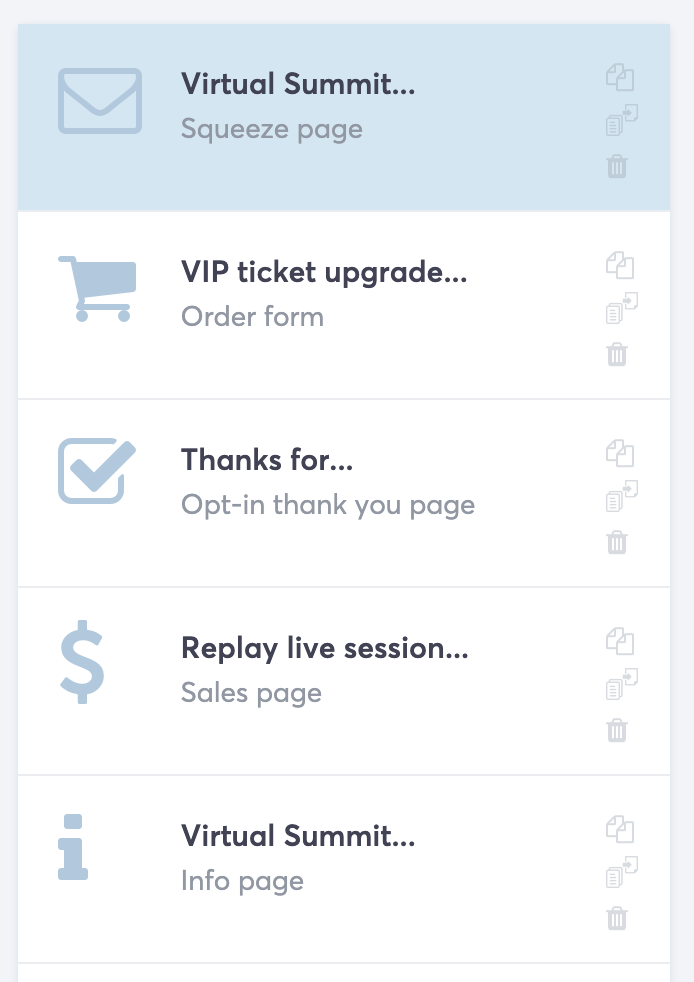
When you import the funnel, you will add 1 funnel and 5 pages so keep that in mind in case you have certain limitations. If you are on a free account with Systeme, you won't be able to import.
You will need a paid account of at least $197/year(the startup plan).
Below is a screenshot of the pages, and links to PDFs of the pages you will be importing.
Affiliate Marketplace Offer
One of the benefits of Systeme.io is that you can post your offer in the marketplace (such as a Virtual Summit or a challenge with upsells) and have other Systeme.io customers who are looking for things to affiliate.
I didn't expect much from this, but I did have 1 affiliate who randomly found me on the Systeme.io marketplace and send me 100+ leads to my virtual summit. Because of this, I felt it's relevant that I include something on this here for you to do as well.
I am including a PDF example of how my Virtual Summit Marketplace offer looked like (it is no longer live, since I am not promoting or selling this summit).
(NOTE: There is an Affiliate Marketplace tutorial and template you can find in the searchable template library).
Speaker Promotion Templates
Considering your speakers will be affiliates, you want to make it easy for them to promote.
They have a lot on their plate as it is - so make their life easier.
To that end, I wanted to share the promotion materials I have created on Canva and give these to you to customize with your own speakers.
You also want to give them some email copy to use to make their life easier to promote the summit.
You can go as big as you want on this really...
Instagram captions, Facebook posts, Instagram posts, size variations of the promotion content, and lots more.
As a summit speaker, I personally found that I almost always end up writing my own promotion anyway as I like to write my own copy.
But the below assets will hopefully be useful to you and you can get inspired on creating your own as you see fit.
Questions & Answers
The topic of virtual summits and setting them up is big.
This section will be reserved for any questions I receive following the release of this template so I can continue to grow the template and make it more usable.

Hey, I'm Eran
I'm the CEO & Founder of Eran Templates (duh), since these are my templates 😉
I've worked for years to create digital assets in my business from email content, Canva slides and posts, website pages, and more.
Now is the time that I share all these creations with as many people as possible to give them a shortcut to getting things done with less time and less effort (without a hefty price tag).
This page was created for paid members only at this stage.
Please do not share it.
You are always welcome to join the affiliate program and help spread the word.
Visit: eran.link/jv