
Cart Abandonment Email Sequence
What is a Cart Abandonment email sequence?
A cart abandonment email sequence is a series of emails that you send to a site visitor who entered their email in the checkout form, but didn't actually end up entering their credit card and paying.
You are basically following up automatically on someone on the verge of buying and getting them back to finish their purchase.
After I released a bunch of email sequence templates one of the members asked if I had a cart abandonment template.
The answer was NO.
However, I DO have a cart abandonment sequence that is set up for my own business as part of my Landing Page in a Day funnel.
So what I did is grab the most complete Cart Abandonment Email Sequence I have set up, added the content to a Google Doc (for anyone who doesn't use systeme.io) and also am including the email campaign sharable link for any Systeme.io customers so you can install this sequence with 1-click.
To set up a Cart Abandonment in Systeme.io you need to set up a “2-step checkout” process which I explain in this tutorial.
Template links & customization instructions
Since cart abandonment is extremely personal to your offer, I wanted to give you some insights as to how I created mine.
It is really simple…
You know the long sales page you created for your offer and most people probably just skim through?
Well, I took each SECTION of the sales page, and turned that ONE section into an email follow up as part of the cart abandonment sequence.
FAQs, testiminonials, bonuses, who it is for, what do you get, features and benefits, and so on.
And just used the content I already wrote on the sales page for the email.
Added a story here and there.
Added an email with a unique coupon code to drive conversions.
And ended the sequence with a question to learn more about them.
I figured after 7 emails if they don’t buy a $5 product, they aren’t going to buy it without getting more in communication with me and see I’m a real human who actually cares.
Tech Tutorial, how to set it up in Systeme.io
Here is a video on how to set up cart abandonment automation in Systeme.
You can watch it directly in YouTube and look at the chapters.
And below you will also find a checklist.
Tech Tutorial Checklist
It's a lot to take in on setting it up :-)
Hopefully, the following checklist will make it easier for you.
Create a tag "Cart Abandon Series [offer]"
Create a tag "[offer] (buyer)"
On the order form, make sure you use "2-step checkout" element
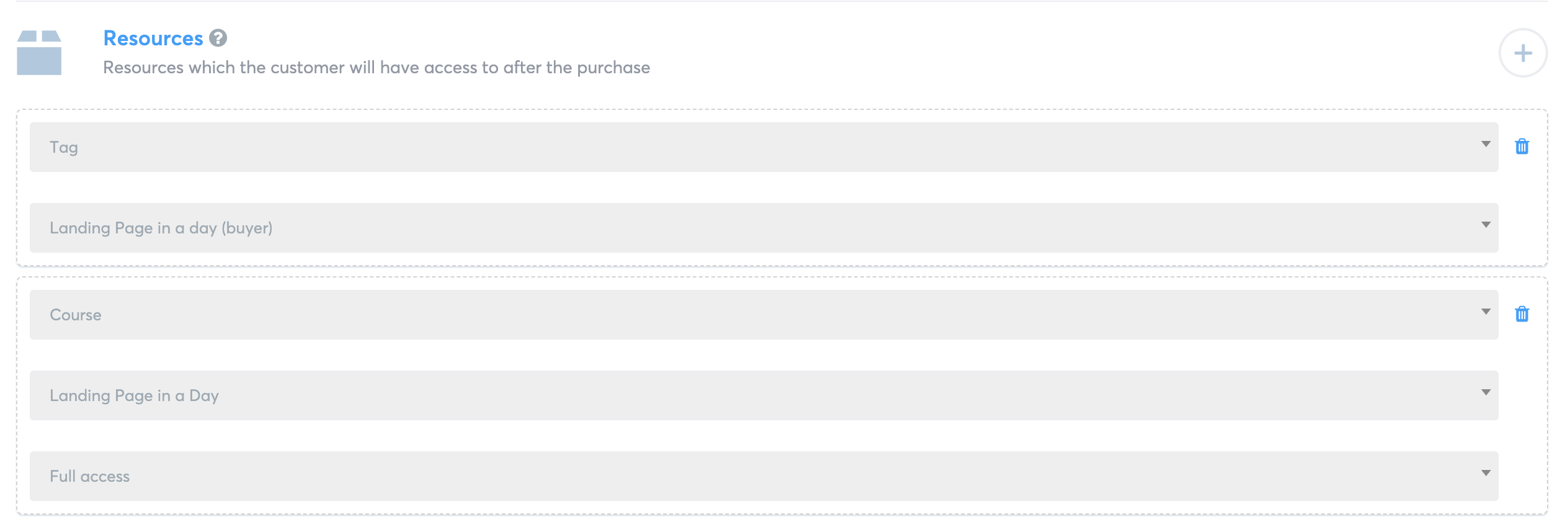
On the "Resources" of the purchase, have the tag "[offer] (buyer)" added so a new buyer is tagged correctly
Install the cart abandonment email sequence from the template
Set up the first email to be sent 1 hour AFTER the subscription (delay of 1 hour)
Set up the remainder of the series to be sent daily (my suggestion)
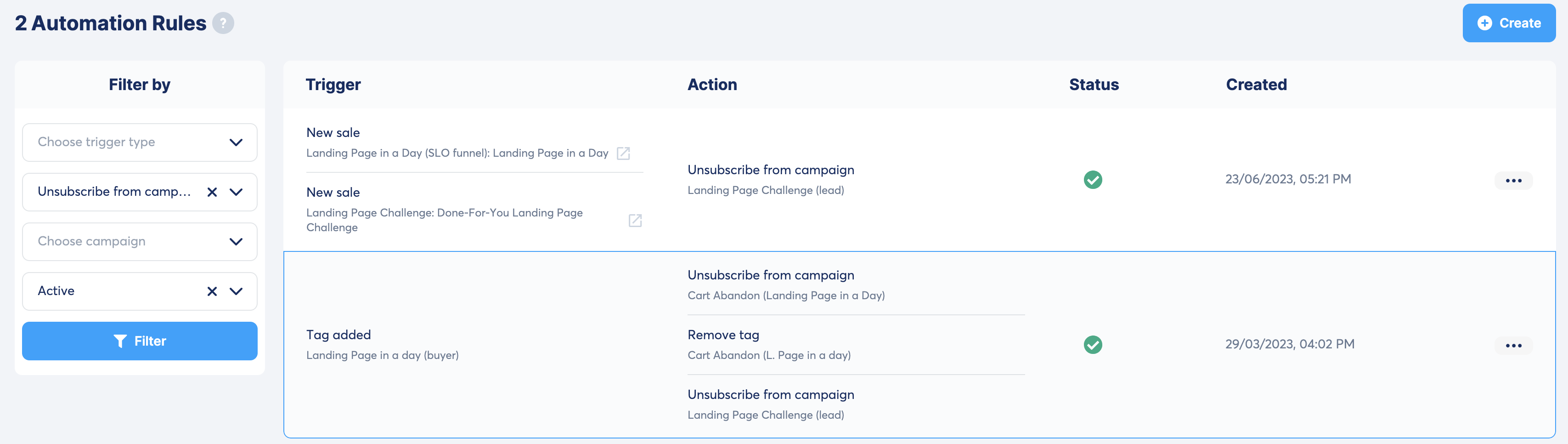
Under "Rules", set up action "when tag is added "[offer] (buyer)" unsubscribe from cart abandonment series, and remove tag "Cart Abandon Series [offer]"
I am going to include the screenshots below for these so you can see how it is set up at my end.
If you are in my tech support membership, you can always book a 1-on-1 call with my tech support team to get help with setting this up together on Zoom.
Automation Rule when someone enters email but doesn't pay

Add resources when a purchase is made
Set up "rule" that when the buyer tag is added, the cart abandonment series stops and tag removed
Feedback on this template
This template has been fun to put together, because I know that at least ONE member really wanted it.
And I hope other members find it valuable.
If you have any questions, comments or feedback, please leave a comemnt on this video.
Eran Bucai

Hey, I'm Eran
I'm the CEO & Founder of Eran Templates (duh), since these are my templates 😉
I've worked for years to create digital assets in my business from email content, Canva slides and posts, website pages, and more.
Now is the time that I share all these creations with as many people as possible to give them a shortcut to getting things done with less time and less effort (without a hefty price tag).
This page was created for paid members only at this stage.
Please do not share it.
You are always welcome to join the affiliate program and help spread the word.
Visit: eran.link/jv